Summary
Quickbase Pipelines lets a builder authorise Slack, Shopify, QuickBooks, Gmail, Snowflake or an internal data source, then run automations against it without being a developer. The risky parts are rarely dressed like risky parts. Sometimes they are a sandbox-or-production selector tucked into a connection form.
I was Lead Product Designer on Pipelines for three years: a reusable OAuth anatomy, AI-generated steps, Bulk Trigger, troubleshooting and a Jinja code mode. I started out treating trust as an explanation problem. The work kept correcting me. Trust also came from where the product stopped, what it refused to commit, and whether a builder could inspect a consequence before it touched real data. The rule underneath all of it: AI could propose and populate work, but people could inspect and change it before a run.
Two years of the AI surface
Start
57 accountsWhere the monthly series of customer accounts using any Pipelines AI feature starts.
- Generate Steps at 173
The headline creation action reaches 173 accounts in a month.
- Peak at 942
Monthly reach across the AI feature set peaks.
- Smart Builder hidden
The project record says Smart Builder was hidden when the Pipelines agent orchestrator was on.
- 862 and 114
Umbrella reach ends at 862 accounts; Generate Steps ends at 114.
Connect an account without hiding the dangerous choice
Every provider asks for its own peculiar thing: OAuth scopes, store URLs, sandbox or production, service accounts, or a permissions ladder long enough to make anyone click through on instinct.
A bespoke screen per connector would have made every new integration a fresh argument. I built one connection anatomy and gave provider-specific complexity a defined place inside it. Permissions were written in plain language instead of raw scope strings, because the person authorising a business workflow is often not an OAuth engineer. Sandbox versus production became a first-class choice, because discovering an environment model after writing to the real books is a terrible onboarding sequence.
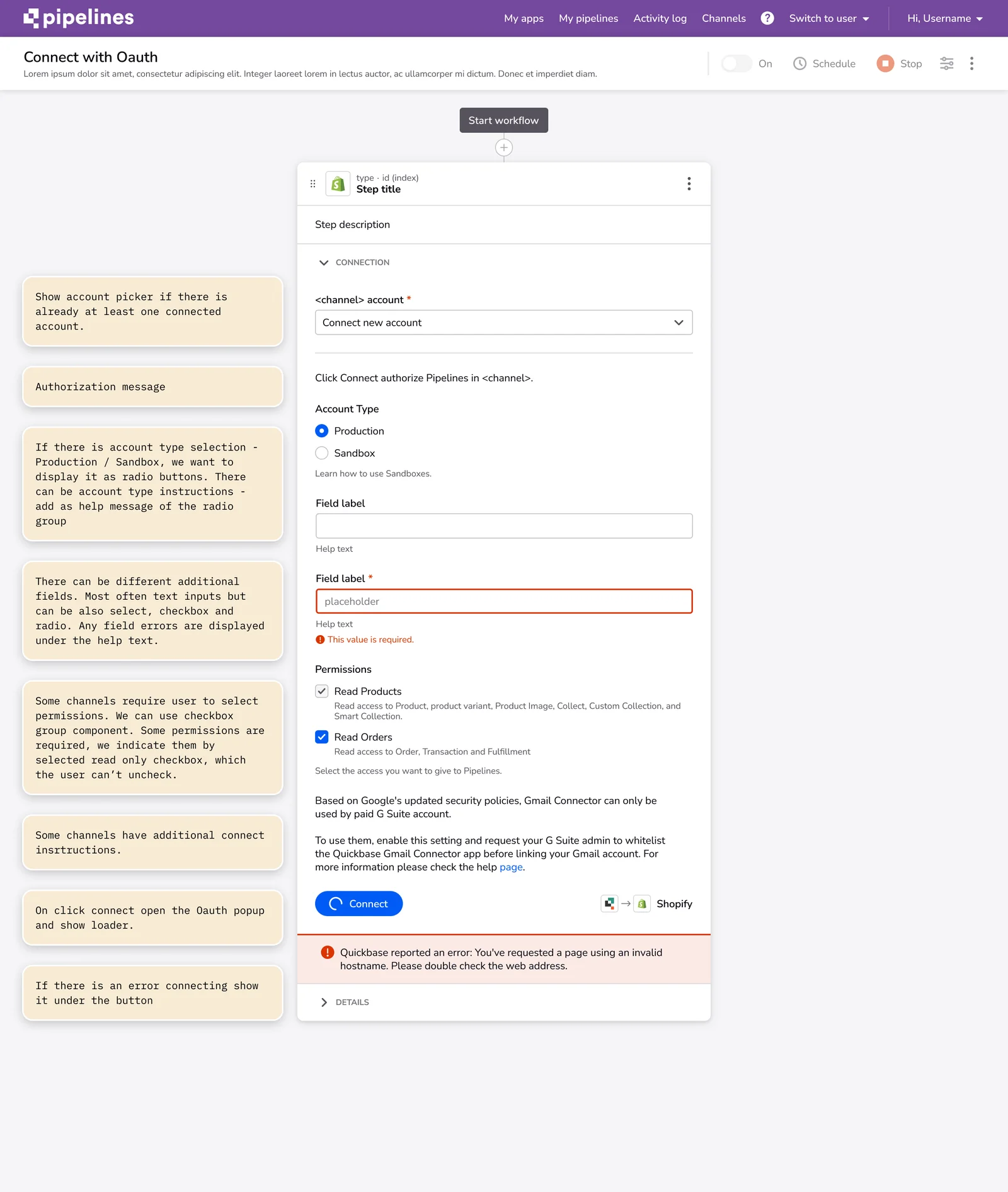
Connectors did not have to look identical. The decisions that could damage data had to behave the same way every time: which account is being connected, what access is being granted, which environment is selected, and what the builder can do next.
Let AI suggest work, then make it wait

A person could know the business action they wanted but not the sequence of steps, field mappings or syntax needed to build it. The model could help with that scaffolding. It should not get to silently decide the scaffolding was correct.
So a builder describes a step, reviews a proposed sequence and inspects the populated fields, and the proposal stays editable. The state model behind it had to cover loading, no answer, usage limits, timeouts, permissions and recovery. Those are usually absent from a pleasant demo until they are suddenly all the product has.
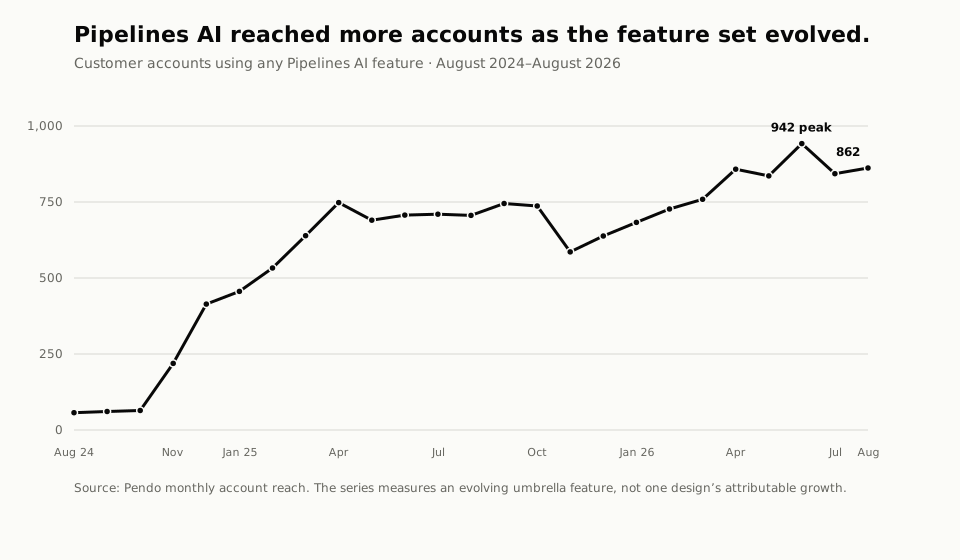
Monthly reach across the AI features moved from 57 accounts in August 2024 to 862 in August 2026, across a feature set that kept changing. The headline creation action went the other way: Generate Steps reached 173 accounts in April 2025 and 114 in August 2026. The product had more AI surfaces by then. The data does not show whether builders migrated, succeeded, or preferred one path.
Count what the Smart Builder funnel actually records
Smart Builder let people begin from a request and open the generated pipeline. From June 13 through September 11, 2026, 42% of measured visitors went from opening Smart Builder, through building and populating steps, to opening the generated pipeline.
That last action does not prove the automation worked. It shows that someone followed the sequence far enough to look. I left the distinction in because this is exactly the kind of conversion number that becomes a portfolio victory lap if nobody asks what it records.
On August 17, 2026, the project record says Smart Builder was hidden when the Pipelines agent orchestrator was on. The older flow was being superseded in that configuration. That says nothing yet about a roadmap, a migration, or whether the replacement is better for a particular builder.
Design for thousands of records
Pipelines originally fired one row at a time. That model gets silly when somebody needs to move thousands of records.
I worked on the Bulk Trigger UX and its feedback loop, including naming cleanup. "Bulk" and "Batch" had been used loosely enough that people could discuss the same feature and mean different behaviour. The terminology work was boring, slightly annoying, and load-bearing.

From July 20, 2025 through July 19, 2026, 60 accounts used the On New Bulk Event Trigger, with no detectable adoption lift after the redesign. That is not the success story I would have preferred. It is the useful one: a niche, high-consequence capability needs a denominator and a definition of a good run before anyone can judge it. Engineering owned the performance improvements, so I do not claim those results.
Make room for advanced builders
The visual editor made Pipelines approachable. It also became a ceiling for people who knew exactly what they wanted to write.
For them I designed a Jinja code-mode editor, plus the lock and disable rules that stop code mode and visual mode from corrupting each other. When code mode owns an expression, the visual controls have to show that ownership instead of quietly rewriting it.
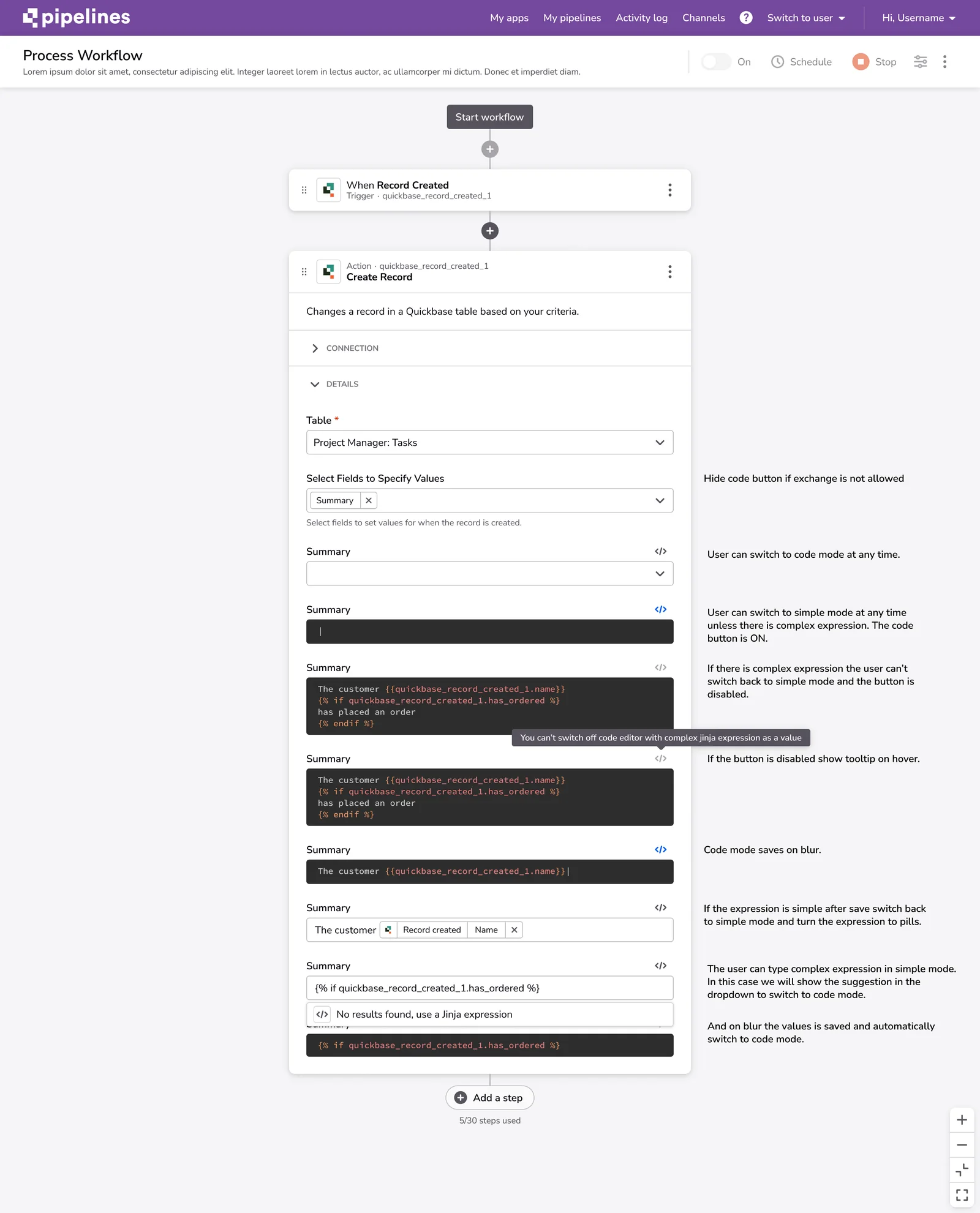
Supporting both paths created ugly rules and doubled a class of edge cases. Removing code mode would have made the product tidier by frustrating the builders most likely to hit its limits. I chose the uglier state model because the alternative hid a real capability boundary.
Troubleshooting made the evidence less flattering
Troubleshooting reached 969 accounts from September 11, 2025 through September 11, 2026. Of 164 feedback events, 35.4% were positive. That is a small sample against the feature's overall use, so I read it as a directional signal, not customer satisfaction.
It belongs here because it changes how I read the rest. A reusable OAuth pattern, editable AI proposals and specialist escape hatches can make a complex system legible. They do not guarantee that a builder understands why an automation failed, or can repair it.
In short
The OAuth anatomy is the bet I would make again: it felt slow when the first connector could have shipped as a one-off screen, but it gave every later integration a stable place for the decisions that mattered. The rest was less elegant. AI may propose the work, but the interface still has to show what will run, what changed, which representation owns the value and where a person can step in, and I learned most of that after the happy path already looked finished. What is still missing is measurement: the product cannot yet tell a pipeline being opened from an automation being useful.
Related work
Designing Pave shows how the same inspectability question shaped a public AI app builder.
Untangling Connection Central follows connected resources and pipelines through a research-led information architecture.