Breathing grids for Pave
The geometry behind the grid.
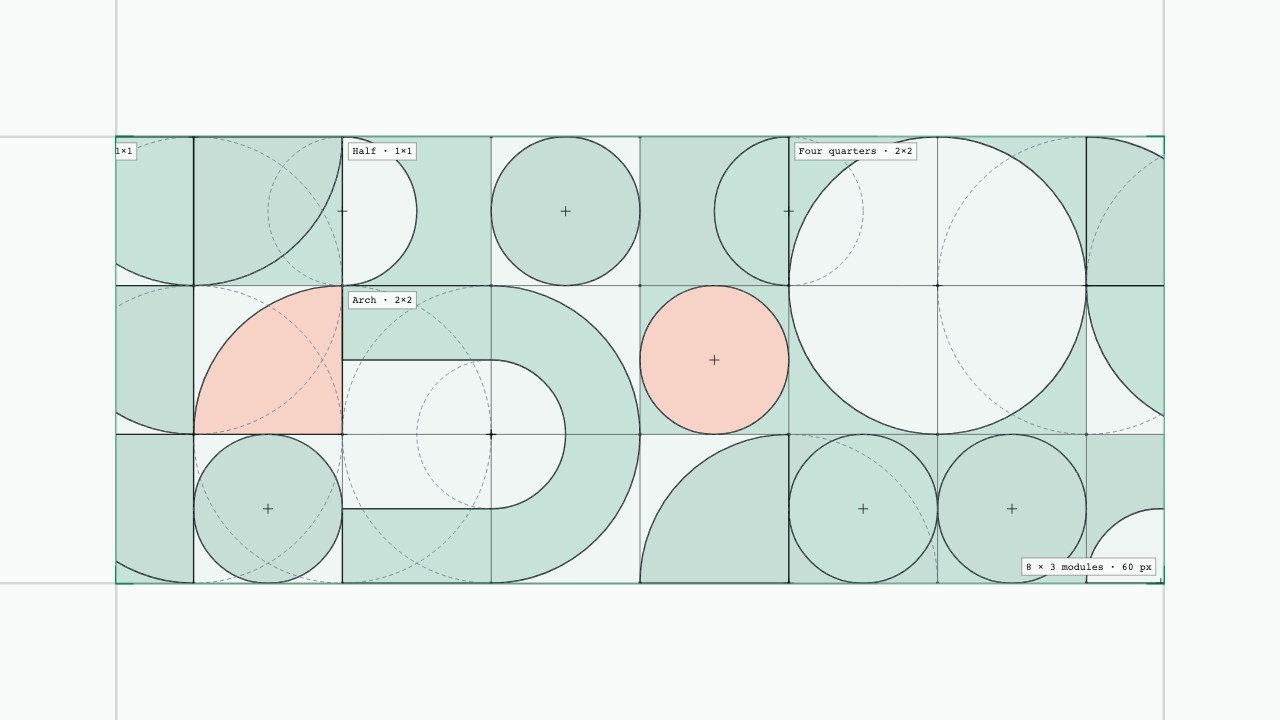
Hover to reveal a cell’s tiling. Click to stamp it or turn a shape.
Blocks and Pixel dither were unshipped explorations. Both were cut. How it’s built starts with an empty grid, zooms into one cell’s wireframe, and holds so you can inspect its geometry.
Blocks
The shapes share a square module: quarters and halves come from the same circles; bars and arches occupy whole multiples of the same unit. Edges land on device pixels, so the composition can change without opening seams. Squares unfold, arcs sweep, and discs grow; a corner-ordered delay connects those different motions. The How it’s built tab exposes the construction grid, outlines, curve guides, and the timing view for each part’s delay and easing.
Pixel dither
Pixel dither carries the same tiling onto an ordered pixel grid. A two-colour Bayer-8 threshold turns the same geometry into shaded pixels. Domes, rims, and short cast shadows suggest depth without adding another palette. Rotation dissolves into a new orientation; the cursor brightens the pixels it crosses. The surface changes while the composition rules stay shared.
Colour has limits too: red is reserved for small figures, never a full cell background. In dark mode, the grounds become dark surfaces and the figures carry the greens. These are prototype decisions you can inspect here; neither direction reached the product, and there is no measured usability outcome to claim.